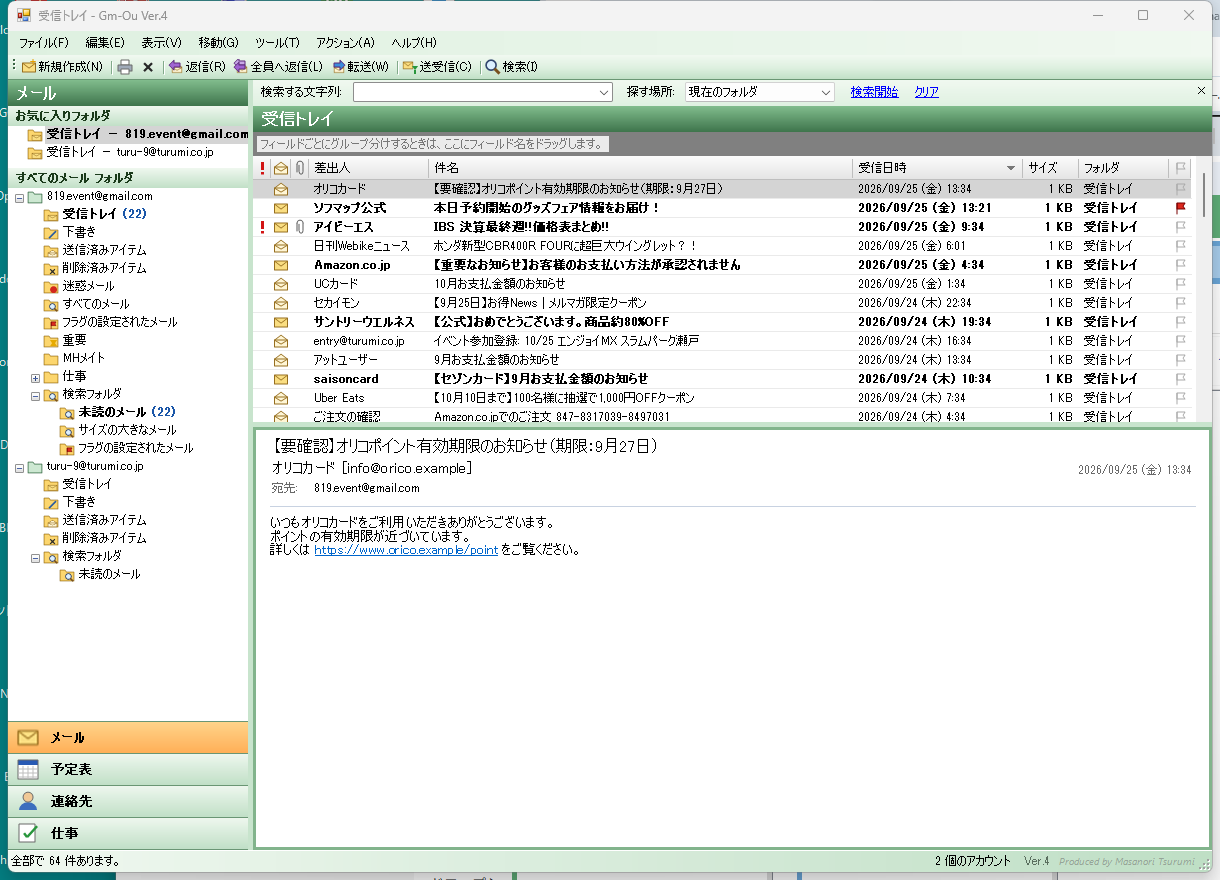
01All your mail, in one place
As many accounts as you likeAdd Gmail, work or shop mail and provider mail — as many as you like. Each appears in its own group on the left.
It receives old-style POP mail tooGmail has stopped collecting POP mail — Gm-Ou still receives it and keeps it on your PC.
A clear three-pane viewFolders, list and message in three panes. Put the message on the right, at the bottom, or hide it.
Receive, reply, forward, searchReceive, reply, reply-all, forward, delete, move to folders, search and print — the everyday actions are all here.
02Getting started
Just run itJust launch the downloaded Gm-Ou.exe — no installation step needed.
Servers filled in for youType your address and the servers for Gmail, Yahoo!, Outlook.com, iCloud and more are filled in automatically. For work mail, enter the settings you were given.
Gmail uses an app passwordFor Gmail, use a Google "app password" (16 characters), not your usual password. A link to create one is built in.
Choose which account sendsWith more than one account, pick the sender when you write. Replies and forwards go from the account that received the mail.
03DownloadComing soon / Ver.6
Distribution of the PC version is paused for now.
For your peace of mind: your mail password is stored encrypted by Windows so that only this user on this PC can read it. It is never sent anywhere, including to us. POP mail is kept only on your own PC.
04Requirements and terms of use
- A Windows PC (.NET Framework 4).
- Receives by IMAP and POP; sends by SMTP (SSL / STARTTLS).
- For Gmail, first turn on 2-Step Verification and create an app password.
- Free to use, at your own risk.
Produced by:TSURUMI Co., Ltd.
Back to Downloads