01Features
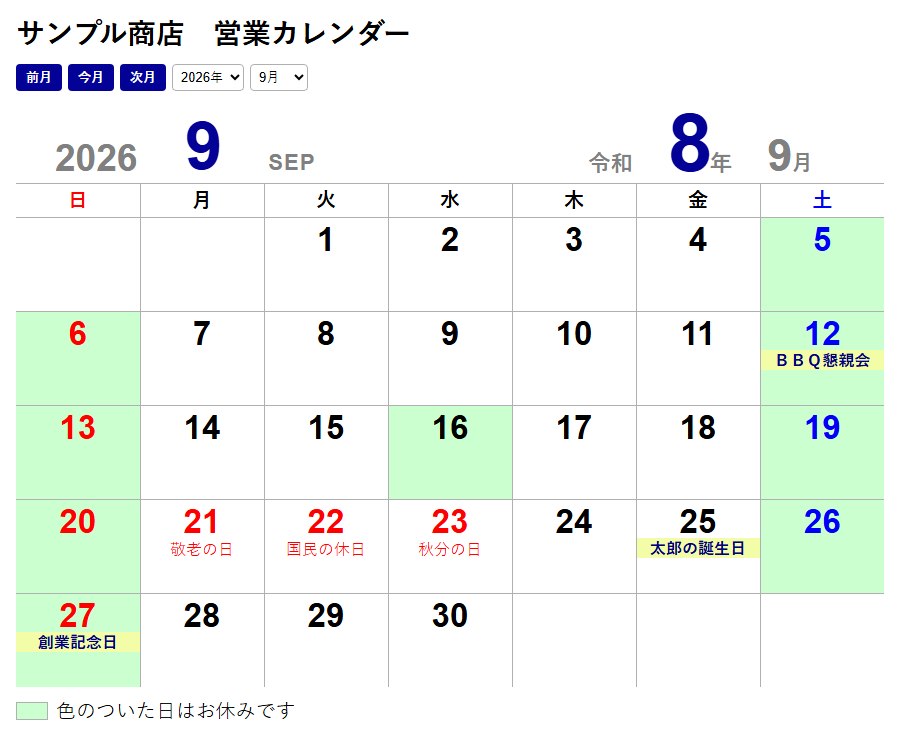
Set closed days with a clickClick a day to toggle between closed (green) and open. Saturdays and Sundays start out green, and public holidays are shown in red automatically.
See working days at a glanceSet a monthly target for working days and it tells you whether you match it. You can also compare all twelve months.
Notes under each dateShow notes such as "Founding day" or "Inventory" under a date. Birthdays and anniversaries can be registered in advance as yearly entries.
Company name, colors and fontsEnter a company name (or your own name), choose background and text colors, and pick a font. Text size adjusts automatically to the size of the calendar.
Printing (A4 / A3 portrait)A preview appears before printing. Margins are automatically minimized so the calendar fills the page. Print a single month or all twelve months of a year.
Embed in your websiteCopy the code, or save it as an HTML file. It automatically shows the current month, lets visitors browse past months, and can even let them pick a preferred date for a reservation.
Family / group bulletin boardAnyone can click a day and post a note under their name. Placed on a shared site, everyone who knows the passphrase sees the same posts.
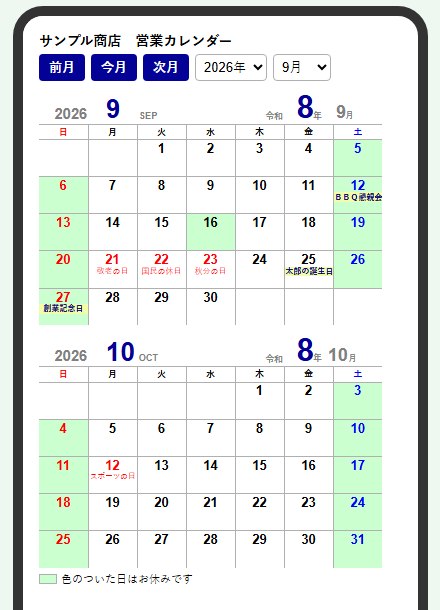
Works on phonesBoth the settings screen and the embedded calendar adapt to a phone screen. On phones the next month is shown below, and a phone preview lets you check how it looks.
02Easy to use, easy to read, versatile
Easy to use
- No installation. Double-click to open; settings are saved automatically.
- No complicated settings. Closed days are set just by clicking dates.
- Nothing is sent to the internet. Sharing posts happens only within your own website.
Easy to read
- Sundays and holidays in red, Saturdays in blue, closed days on a green background — working days are clear at a glance.
- Large date numbers with a short note underneath — a wall calendar that can be read from a distance.
- Text scales automatically with the calendar, so it stays tidy on PCs, phones and paper.
Fits many situations (versatile)
- Companies and shops: make a business calendar for the storefront or your website.
- Families: your own household calendar with birthdays and anniversaries, viewable on phones too.
- Groups and clubs: a schedule board that everyone can write on.
- Reservations: let customers choose a preferred date with closed days excluded.
03Screenshots
On a PC (embedded in a website)
On a phone (this month and next)
04DownloadFree / Ver.5
Everything (ZIP)
Contains the Windows app, the browser version, and usage and description guides.
Windows version (executable)
Double-click to open. No installation needed.
Browser version (phones, Mac, etc.)
Open it and use it right away. Settings stay in that browser. You can also save it as a file and use it offline.
When opening the executable for the first time: if Windows shows "Windows protected your PC," click "More info" then "Run anyway" (this appears because the file is not digitally signed).
To share the bulletin board on a website, you need a site that supports PHP. See the included usage guide for details.
05Requirements and terms of use
- Windows version: Windows 10 / 11 with Microsoft Edge or Google Chrome installed.
- Browser version: recent versions of Edge, Chrome, Safari and Firefox, including iPhone and Android.
- Free to use, at your own risk. Public holidays are calculated automatically for the years 2000 to 2099.
Jiyu Calendar is a free tool rebuilt for everyone, based on the business calendar of our motorcycle shop "Bike wa Tanoshii MotoHarbour."
Produced by:TSURUMI Co., Ltd.
Back to Downloads